DXVK for WotLK 3.3.5a: Smoother Frames on Vulkan
Part 1 got the client stable. This is the one that makes it feel good — same peak FPS where things were already fine, but the constant micro-stutter is gone and Dalaran stops being a slideshow. Plus the antivirus popup that's going to scare you, and exactly why it's fine.
This picks up where the FPS & crash guide left off. Everything there — the 4GB patch, the video settings, config.wtf — still applies and comes first. DXVK is the last step, and the one people get wrong most often, so it gets its own page.
What DXVK is: a real-time translator. It intercepts every Direct3D 9 call the client makes and re-issues it as Vulkan, which your GPU driver handles far better than the creaky 2009-era Direct3D 9 path Blizzard shipped. It is not an emulator, and it is not a hack — there's no memory reading and no automation, it only touches rendering. It's used heavily across the WotLK community; its own forums have long-running threads on it.
1.Be honest about what it does
My rig from Part 1: i7-13700, RTX 3080 Ti, Gen4 NVMe. Here's what DXVK actually changed:
- Orgrimmar bank, my Part 1 benchmark spot: 88 → 88. No change. I was already sitting on the single-thread ceiling there, and DXVK doesn't move that.
- The general feel: noticeably smoother. Frametimes are more even and the constant low-level micro-hitching is gone. This is the part you feel more than measure.
- Dalaran: from "don't even benchmark here" to a stable 60–90. That zone falls apart on the old Direct3D 9 path specifically; Vulkan handles it.
So the honest read: if your problem is peak FPS in a normal spot, DXVK probably won't fix it — that's the CPU thread, and no rendering layer changes it. If your problem is stutter, hitching, crashes, or the pathological zones, that's exactly what DXVK is good at. On my machine it didn't add a single frame at my benchmark spot and I'm keeping it anyway, because the game just feels better.
2.Before you start
- The 4GB patch from Part 1 is now mandatory, not optional. DXVK adds its own memory overhead on top of the client, and a 32-bit WoW without the patch will crash under it.
- A reasonably current GPU driver. DXVK 3.1 needs Vulkan 1.3, which any NVIDIA or AMD driver from the last couple of years supports. If 3.1 refuses to launch, the fallback is the older
dxvk-1.10.3. - Set the client to plain Direct3D 9. In chat:
/console gxApi d3d9— noted3d9, notd3d9ex. Then fully close WoW.
3.Download it — from GitHub, nowhere else
Go to github.com/doitsujin/dxvk/releases. Under the latest release's Assets, download dxvk-3.1.tar.gz — the actual release asset, not "Source code (zip)" or "Source code (tar.gz)".
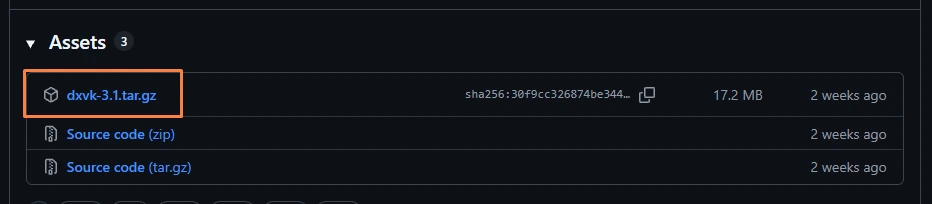
The `.tar.gz` asset, not the source-code links below it. GitHub shows its SHA-256 right there — note the first few characters.
Extract it with 7-Zip (it's a .tar inside a .gz, so you may need to extract twice). Inside you'll find an x32 and an x64 folder. WoW 3.3.5a is 32-bit — you want x32, no matter that your Windows is 64-bit. And of the five DLLs in there, you only need one: d3d9.dll.
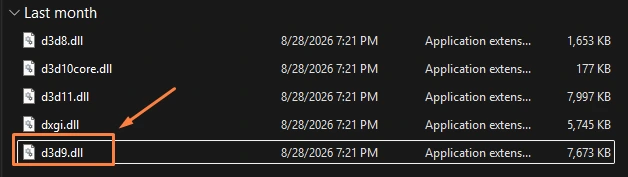
From x32, take only d3d9.dll. Ignore the rest.
4.The Windows Defender false positive (you will hit this)
The moment you put d3d9.dll in your WoW folder, Windows Defender may flag it — something like Trojan:Win32/Posilod.EB!cl, marked Severe. Don't panic, and don't blindly click Allow either. Verify it.
Why it happens: DXVK's DLLs are open-source but not digitally signed, and the file does exactly what antivirus heuristics are trained to distrust — it takes over a Windows system DLL name and hooks the graphics pipeline. Freshly downloaded + unsigned + API-hooking is a textbook false-positive trigger, and the !cl on the end means it's a cloud machine-learning guess, not a signature match. ReShade and ENB get flagged the same way.
How to verify for yourself:
- Confirm you downloaded from
github.com/doitsujin/dxvk/releasesand nowhere else. If it came from a "dxvk download" site, a YouTube link, or a Discord message — stop, delete it, and let Defender remove it. - Drag your
dxvk-3.1.tar.gzonto virustotal.com and look at the number.
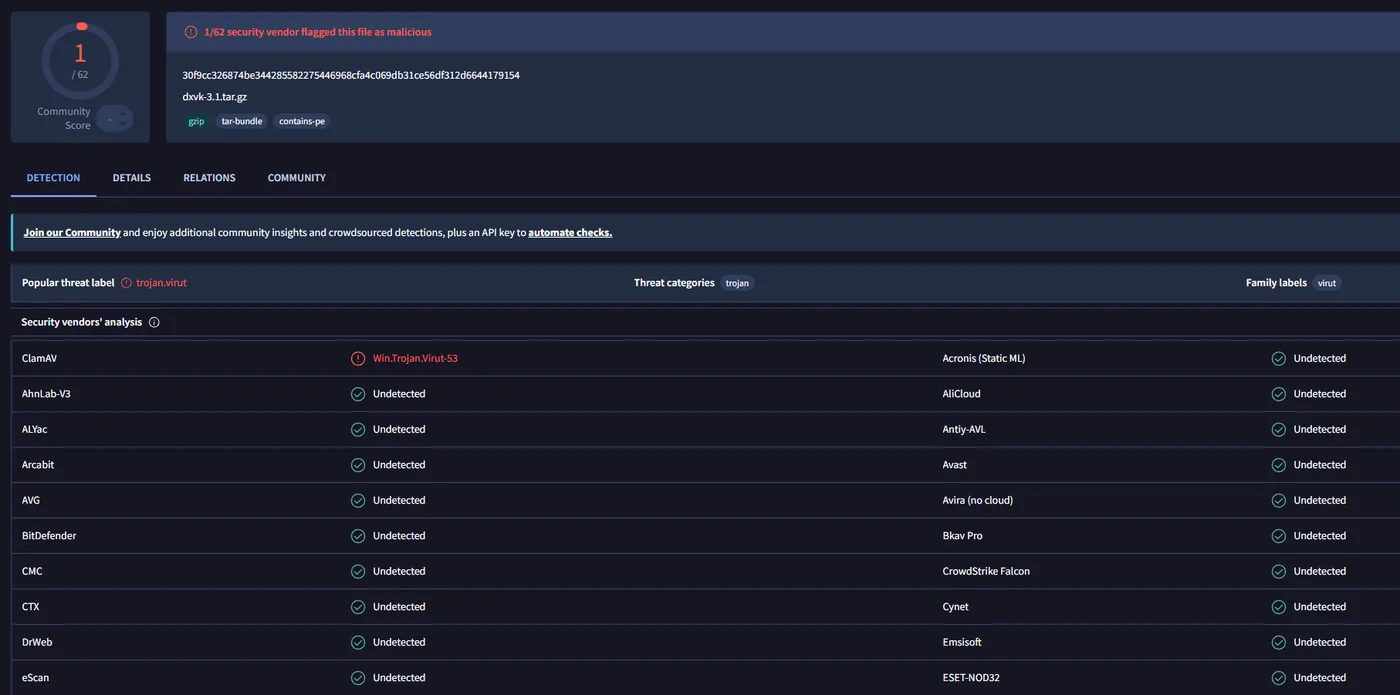
1 / 62. The lone flag is ClamAV — a free scanner famous for exactly this kind of false alarm — while Microsoft, BitDefender, ESET, CrowdStrike and 58 others say clean. And the hash matches what GitHub shows for the release. That's a false positive with certainty.
To then actually use it: restore the file (Windows Security → Protection history → the flagged item → Allow), and if it still won't stay, add a Defender exclusion for that one specific file — Manage settings → Exclusions → Add → File → H:\_classic_\d3d9.dll. Not the folder, not the drive, just that DLL.
An exclusion means Defender stops scanning that exact file, forever. For a DLL you placed yourself and don't touch, that's a small, knowing risk — but it is a real one, and it's your call. If this whole dance feels wrong, DXVK isn't worth forcing. Part 1 already did the heavy lifting.
5.Install
If you followed Part 1, ReShade is currently sitting in your WoW folder as d3d9.dll. DXVK needs that exact filename, so first rename ReShade's out of the way:
- Rename
H:\_classic_\d3d9.dll(the ReShade one) tod3d9.dll.reshade-backup. We put ReShade back a different way in step 7. - Copy DXVK's
x32\d3d9.dllintoH:\_classic_\, right next toWow.exe.
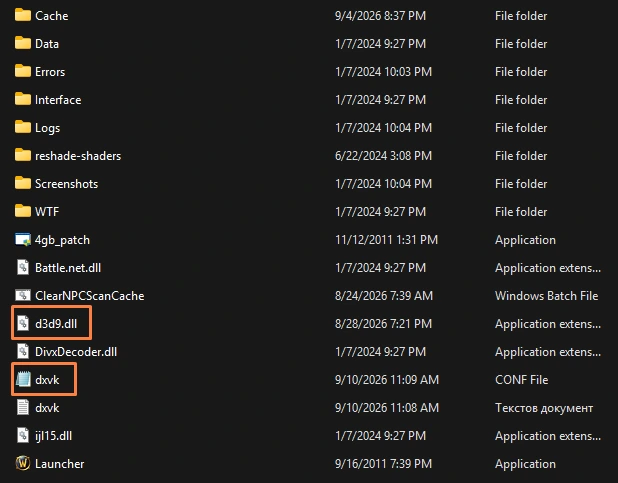
Both files sit in the root of your WoW folder, alongside Wow.exe and the 4gb_patch.
6.The config file
Optional, but do it — the HUD line is how you'll confirm DXVK is actually running. Make a file called dxvk.conf next to Wow.exe. In Notepad: paste the lines below, then File → Save As, set "Save as type" to All Files, and name it dxvk.conf (not dxvk.conf.txt).
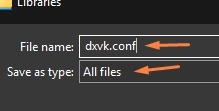
"All Files" is the step everyone misses — without it you get dxvk.conf.txt and DXVK ignores it.
d3d9.floatEmulation = True
d3d9.maxFrameRate  = 141
dxvk.hud            = full
floatEmulation— a rendering-correctness setting the 3.3.5 client behaves better with.maxFrameRate = 141— an in-wrapper frame cap. On a 144 Hz screen, cap here and turn in-game VSync OFF: this old engine can drop to a hard half-rate (144 → 72) when it's VSync-locked, and a cap gives you the smoothness without the input lag. G-Sync / FreeSync users: VSync ON in the NVIDIA/AMD control panel, off in-game, same 141 cap.dxvk.hud = full— shows DXVK's overlay. Trim it todxvk.hud = fpsor delete the line entirely once you're satisfied it's working.
7.First launch & ReShade
Start WoW. You should see DXVK's green overlay top-left. With dxvk.hud = full it spells out the version, your GPU and the API — on my machine that block reads DXVK v3.1, D3D9, NVIDIA GeForce RTX 3080 Ti, then a wall of pipeline and memory stats. The game's own FPS counter physically can't print any of that, so if you see the version and your card there, it's working.
Now fly around Orgrimmar, Stormwind, Dalaran and out to a zone for a few minutes. You'll get short stutters the first time you see each area while shaders compile into a Wow.dxvk-cache file. This is one-time — that cache persists, so every visit after is smooth. Then trim the HUD line.
ReShade back on — in Vulkan mode. DXVK now owns d3d9.dll, so ReShade can't use that name. Re-run the ReShade installer, pick Wow.exe, and this time choose Vulkan instead of DirectX 9 (DXVK makes the game effectively Vulkan now). It installs as a Vulkan layer and doesn't touch d3d9.dll. Your preset loads exactly as before — press Home, pick realnibba-reshade.ini.
8.Is it worth it?
It depends what's actually wrong with your game:
- Low peak FPS in a normal spot — probably not. That's the single CPU thread, and DXVK doesn't touch it.
- Stutter, hitching, frequent crashes, or a specific zone being unplayable — yes, clearly. This is what it's for.
On my rig it added zero frames at my benchmark spot and I still run it, because the game feels smoother everywhere and Dalaran is finally usable. If you're on a weaker GPU, or you're not comfortable adding an antivirus exclusion, skipping DXVK is a completely reasonable call — Part 1's fixes are the ones that matter most.
9.Uninstalling
- Delete
d3d9.dll,dxvk.conf,dxvk.logandWow.dxvk-cachefrom your WoW folder. - Rename
d3d9.dll.reshade-backupback tod3d9.dll(restores ReShade the Part 1 way), or re-run the ReShade installer in DirectX 9 mode. - Set the client back:
/console gxApi d3d9ex. - Remove the Defender exclusion if you added one.
10.Common questions
Is DXVK safe to use on WotLK 3.3.5a?
It's a rendering translation layer — it converts Direct3D 9 calls to Vulkan, doesn't read game memory and doesn't automate anything, so it's not a hack. It's used heavily across the WotLK community, and its forums host guides for it. It's still a client-side DLL modification, so use it at your own discretion.
Why does Windows Defender flag DXVK's d3d9.dll as a trojan?
The DLL is open-source but not digitally signed, and it replaces a Windows system DLL name and hooks the graphics pipeline — a textbook heuristic false-positive trigger. Names like Trojan:Win32/Posilod.EB!cl end in !cl, meaning a cloud machine-learning guess, not a signature match. Verify by confirming you downloaded from github.com/doitsujin/dxvk/releases and checking the archive on VirusTotal — the check above came back around 1 of 62, the lone flag usually ClamAV.
Does DXVK increase FPS in WoW 3.3.5a?
Not necessarily your peak FPS where the game was already running fine — that ceiling is the single CPU thread, and no rendering layer changes it. What DXVK does is smooth out frametimes, remove the constant micro-hitching, and fix zones that fall apart on the old Direct3D 9 path — Dalaran in particular goes from a slideshow to a stable 60–90.
Should I use DXVK or D3D9Ex for WotLK?
Do D3D9Ex first — it's a free one-line change (/console gxApi d3d9ex, covered in Part 1) that clears many memory crashes on its own. DXVK is the bigger fix: it needs a downloaded DLL, a config file, an antivirus exclusion and a ReShade reinstall, but it's what smooths the frametimes and fixes the broken zones. Set the client back to plain d3d9 before installing DXVK.