Farm PackGold per hour, routes and sessions
Record every farming session in real time, follow routes on your map, and know exactly what a farm spot is worth.
Farming for an hour and having no idea afterwards whether it was a good spot is how people repeat a mediocre route for months. Farm Pack measures it: gold per hour, nodes gathered, items looted and time spent, saved to a history you can compare.
- Version
- 1.0 beta
- Game
- WotLK 3.3.5a (Interface 30300)
- Folders
- RealNibba.Pack + Auctionator
- Opens with
- /rnpack or minimap button
- Settings
- /rnconfig
- Cost
- Free
- Download
- 1.5 MB zip
What Farm Pack does
Farm Pack has three jobs. It tracks farming sessions so you can compare spots with numbers instead of feelings, it draws farming routes on your world map and minimap so you can follow an efficient path in a zone you do not know, and it helps you sell what you farmed by putting a value panel at the Auction House and a helper at the mailbox.
The tracker is deliberately simple to use: press Start when you begin, Stop when you finish, and the session is saved automatically. Everything else, such as the map trail and the minimap node flash, is optional and can be tuned or switched off.
How it works, feature by feature
Sessions and gold per hour
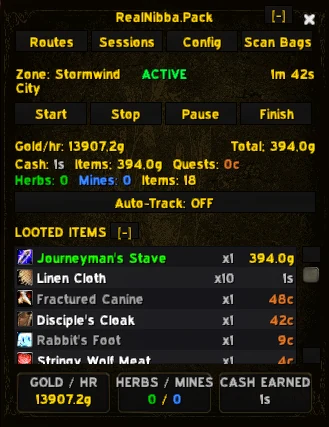
While a session runs, the window shows gold per hour, total gold earned, the nodes you gathered or items you looted, and the time and zone. Stop the session and it is stored in the session history, which lists past sessions with their zone, gold, herbs, mines and items, so a week of casual testing gives you a real answer to which spot is better on your own realm and at your own times of day. If a session was interrupted, for example by a crash or a reload, the addon restores it as paused when you come back and you can press Start to continue.
Routes on your map
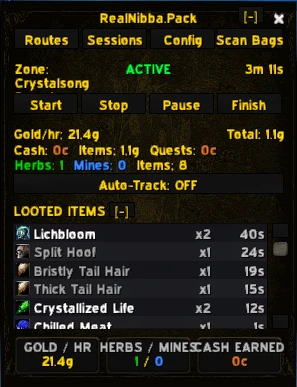
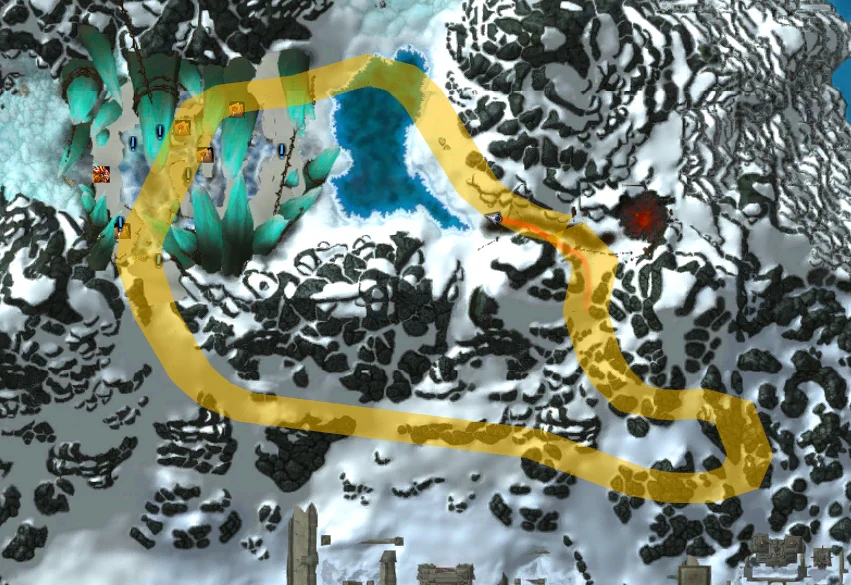
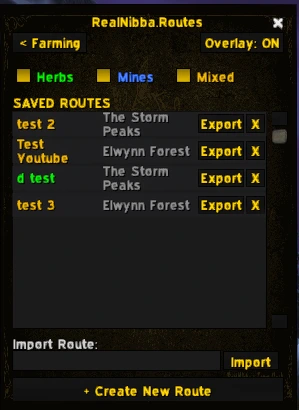
Load a saved route and it is drawn on the world map and the minimap. You can record your own by flying or walking the path with recording switched on, export a route as a share string to paste in chat or Discord, import one that someone else made, and share routes with your group. A route has to be loaded, not just imported, before it shows on the map, so import and load are two steps.
Bag scanner and price sources
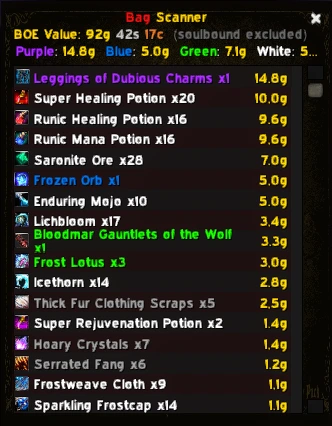
The Bag Scanner adds up what is in your bags, item by item, sorted by quality, so you know what a run was worth before you sell. Each quality can use its own price source: TradeSkillMaster if you have it, then Auctionator, then plain vendor price, and you can override the price of a single item by hand. Check the price-source order once, because a value based on vendor prices will always undercount.
Auction House and mailbox helpers
A panel opens by itself at the Auction House showing the estimated value of what is in your bags and ready to post, and another appears at the mailbox to make bulk mailing of farmed goods to a bank character quicker. Neither needs a separate window.
Map extras
Optional map features include a player trail of dots on the map and minimap (colour, length, fade time, spacing, size and opacity are all adjustable), a minimap node flash that alternates node icons between normal and glowing so herbs and ore stand out, and auto-tracking that swaps the minimap tracking between Herbs and Minerals on a timer of your choice.
Installing Farm Pack
- DownloadGet farmpack.zip from the button on this page. It contains
RealNibba.Packand a tested copy ofAuctionator. - ExtractWith the game closed, extract both folders into
Interface\AddOns. Delete any older Auctionator folder first and keep only the bundled one. - Log inType
/rnpackto open the window, or click the minimap button. Type/rnconfigfor the settings.
Farm Pack is a beta release. It is used every day for real farming, but expect the occasional rough edge, and please report anything odd.
Commands and settings
| Command | What it does |
|---|---|
/rnpack | Open or close the Farm Pack window (also /realnibbapack). |
/rnconfig | Open the settings (also /rnpackconfig). |
- Loot Settings covers the price source for each item quality and which qualities are tracked.
- Map Features covers the player trail, the minimap node flash and auto-tracking.
- Interface holds the window scale, where 100 percent is the default size.
ElvUI, Carbonite and Auctionator
Farm Pack works with ElvUI and gets skinned automatically. It detects Carbonite and, because Carbonite takes over the world map, switches off the player trail and node flash to avoid conflicts, while sessions and bag scanning keep working. Auctionator is included and is needed for accurate pricing when TradeSkillMaster is not installed. MarketWatch bundles the same copy, so if you run both, keep a single Auctionator folder.
Tips and troubleshooting
- Compare spots fairly. Run a full, uninterrupted session at each spot at a similar time of day, because competition changes the number more than people expect.
- Gold per hour looks low. Check the price source. Vendor prices undercount anything that sells for more on the Auction House.
- A route does not show. Make sure it is loaded, not only imported.
- No trail or node flash. Carbonite disables those two features on purpose.
Farm Pack FAQ
QDoes Farm Pack work for herbs, ore and other farming?
Yes. It records gold and loot for any session, and counts herbs and mines separately.
QWhich price sources does it use?
TradeSkillMaster if installed, then Auctionator, then vendor price, and you can set the order for each item quality and override single items.
QCan I share a route with a friend?
Yes. Export a route as text, or share it with your group, and the other person imports it and loads it.
QWhat happens if I crash mid-session?
The previous session is restored as paused, so you can press Start and carry on.
QDoes it work with Carbonite?
Farm Pack detects Carbonite and switches off only the player trail and the minimap node flash, because they conflict with Carbonite's world map. Sessions and bag scanning are not affected.
Get Farm Pack
farmpack.zip · 1.5 MB · version 1.0 beta · free
Contains RealNibba.Pack and Auctionator. Extract into your Interface\AddOns folder as described in the install section, then reload the game.
The rest of the lineup
See all five addons. Running more than one? The addon suite setup guide covers the folder layout and the two shared dependencies.