MarketWatchTrade chat, sorted
Turns the endless stream of WTS, WTB and WTT messages into a tidy list you can filter, save from and get deal alerts about.
On a busy realm anything worth seeing in Trade is buried under a dozen unrelated posts within a minute. MarketWatch reads the chat for you, sorts every offer into a category, hides the sellers you do not want to hear from, and flags listings priced well under market.
- Version
- 1.0
- Game
- WotLK 3.3.5a (Interface 30300)
- Folders
- MarketWatch + Auctionator
- Opens with
- /mw or /marketwatch
- Prices from
- Auctionator or TSM
- Cost
- Free
- Download
- 1.8 MB zip
What MarketWatch does
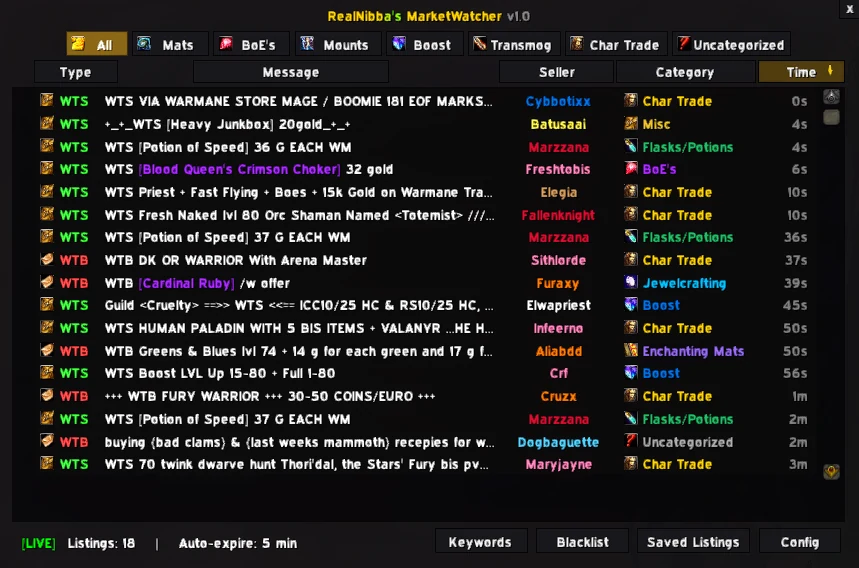
MarketWatch listens to Trade, General, Yell and Say, picks out every WTS, WTB and WTT post, and files each one under a category: materials, BoE gear, mounts, transmog, boosts and character trades. You get a window that looks and feels like an Auction House search, except that every row is a real offer from a real player who is online right now.
It is meant to be left running. Instead of scrolling back through chat history to find the offer you half noticed a minute ago, you glance at the list when you want to buy or sell something specific, and you let the deal alerts interrupt you only when something is priced well below market.
How it works, feature by feature
Categories and filters
Category buttons across the top filter the list to one kind of offer, and All shows everything together. Right-clicking a listing opens a short menu: Contact Seller opens a whisper to them, Copy Message gives you the text to paste elsewhere, Save Listing keeps it, and Blacklist Seller hides the poster. A sorted list is also a working list.
Keywords that highlight what you want
Add a keyword and every listing containing it is highlighted in red. If you are shopping for a specific item, type a fragment of its name and it will stand out the moment somebody posts it. A short fragment works as well as the whole name.
A blacklist that quietens repeat posters
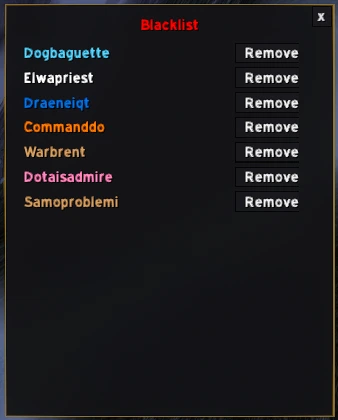
Trade chat has regulars who repost the same message every couple of minutes. Blacklist a sender and everything they post is hidden from the list from then on. Names can be removed again from the blacklist panel whenever you like.
Saved listings
If a mount, a transmog piece or a bundle of materials looks interesting but you are not ready to buy yet, save it. Saved listings stay in their own panel so you can come back to them later instead of trying to remember a seller name and a price.
Deal alerts against real market prices
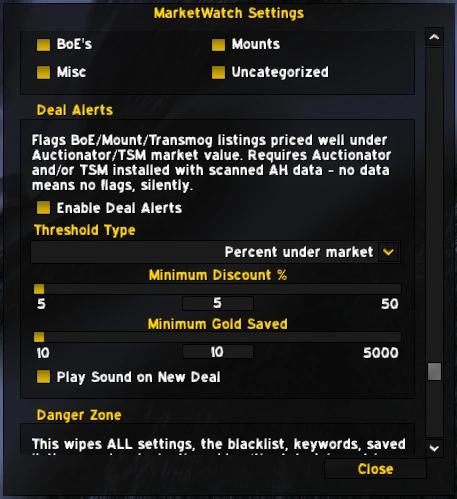
When pricing data is available, MarketWatch compares BoE, mount and transmog listings with the market value from Auctionator or TradeSkillMaster and flags the ones priced well under it. You choose whether the threshold is a percentage or a flat amount of gold, and how large the saving has to be. A listing more than 50 percent under market is never flagged on purpose, because that usually means a wrong item match or a scam rather than a bargain. The alert sound plays once when a listing first becomes a deal, not on every repost of the same offer.
Installing MarketWatch
- DownloadGet marketwatch.zip from the button on this page. It has two folders:
MarketWatchand a tested copy ofAuctionator. - ExtractClose the game and extract both folders into
Interface\AddOns. If you already have an Auctionator folder, delete it first and use the bundled one. - Log in and finish the tutorialType
/mw. The addon starts with a short built-in tutorial that has to be completed once before the window unlocks.
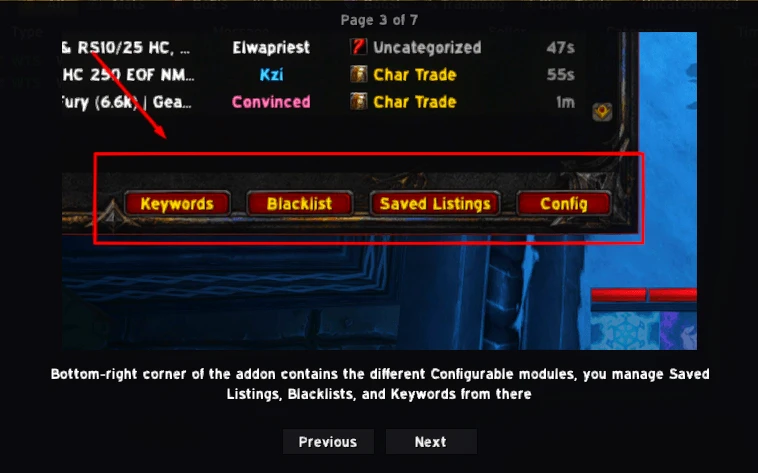
The tutorial ends with a few questions about what you just saw. Answering wrongly counts as a failed attempt, and ten failed attempts lock the addon for five minutes, so take a minute to read the slides.
Commands and settings
| Command | What it does |
|---|---|
/mw | Open or close the main window (also /marketwatch). |
/mw config | Open the settings. |
/mw transmog | Open the transmog listings panel directly. |
/mw trade | Open the character trade listings panel directly. |
In Config you choose which categories to track, the size of the window, how long messages are kept, the maximum number of listings stored per category, and which chat sources are scanned. The Deal Alerts section holds the threshold type, the minimum discount, the minimum gold saved and the alert sound. A factory reset button wipes all settings, the blacklist, keywords and saved listings, and locks the addon again so the tutorial has to be repeated. Use it only if the addon misbehaves and nothing else fixes it.
Auctionator and price data
Deal alerts are only as good as the prices they are compared with, which is why a tested build of Auctionator (version 2.6.8) is included in the download. Auctionator needs scanned Auction House data to be useful: with no data, MarketWatch flags nothing and says nothing, and if your last scan is more than two weeks old you will see a reminder to rescan. TradeSkillMaster price data works as well when you have it.
Keep only one Auctionator folder. MarketWatch and Farm Pack both bundle the same copy, and two different versions side by side are the most common reason for deal alerts to show wrong numbers.
Tips and troubleshooting
- No deal alerts at all. Open the Auction House and run an Auctionator scan. Without recent data nothing can be compared.
- A post landed in the wrong category. Unusually worded posts can confuse automatic sorting. Use keywords and the blacklist to steer around the ones that keep doing it.
- The window is too big or too small. Use the size slider in Config. The configuration window itself stays put while you drag it.
- Listings disappear. That is the message lifetime setting. Save anything you want to keep.
MarketWatch FAQ
QWhich chat channels does MarketWatch read?
Trade, General, Yell and Say. In Config you can choose which of these sources are scanned.
QDo I need Auctionator?
Only for deal alerts. The download includes a tested copy so you do not have to hunt for a compatible version.
QWhy does it start with a tutorial?
The tutorial makes sure you know where the blacklist, keywords, saved listings and settings are before the window unlocks. It only has to be done once, or again after a factory reset.
QWill it flag scams as deals?
It is built not to: anything more than 50 percent under the market price is never flagged, because that usually means a wrong match or a scam.
QDoes it work alongside Farm Pack?
Yes. They share the same bundled Auctionator, so keep a single copy of that folder.
Get MarketWatch
marketwatch.zip · 1.8 MB · version 1.0 · free
Contains MarketWatch and Auctionator. Extract into your Interface\AddOns folder as described in the install section, then reload the game.
The rest of the lineup
See all five addons. Running more than one? The addon suite setup guide covers the folder layout and the two shared dependencies.