RareHuntFrostbitten & Bloody Rare tracker
A community-synced tracker for the rare spawns behind the Frostbitten and Bloody Rare achievements, with respawn estimates and warnings before a rare is due.
Rare hunting is mostly waiting and guessing. RareHunt turns the guessing into shared data: every player running the addon reports what they see, your client builds a respawn estimate from those reports, and you get a sound and an on-screen banner before the window opens.
- Version
- 1.0
- Game
- WotLK 3.3.5a (Interface 30300)
- Folder
- RareHunt
- Opens with
- /rh or /rarehunt
- Covers
- 23 Northrend + 20 Outland rares
- Cost
- Free
- Download
- 568 KB zip
What RareHunt does
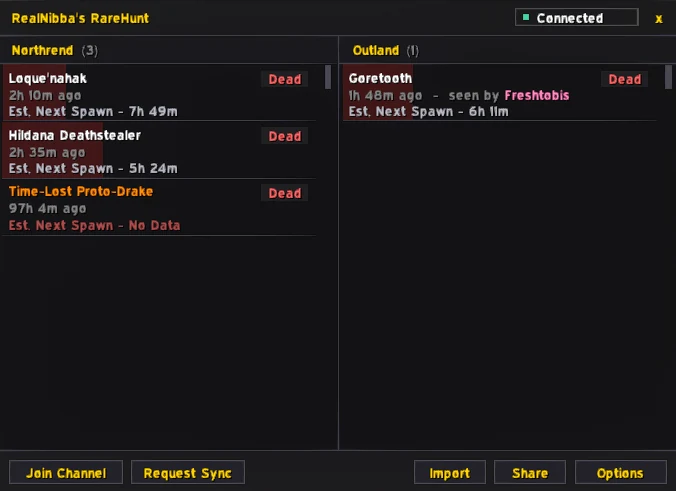
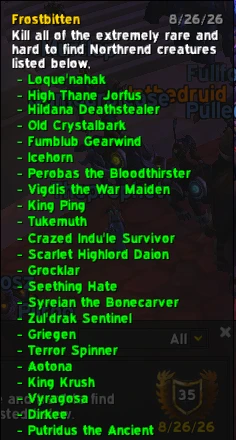
RareHunt tracks the rare creatures you need for two meta-achievements: Frostbitten, which asks for 23 rare creatures in Northrend, and Bloody Rare, which asks for 20 in Outland. Instead of a spreadsheet, you get one window with a Northrend column and an Outland column and a timer for each rare.
There is no central server behind it. Everyone who runs RareHunt shares sightings over a shared, hidden chat channel, and each client works out the next likely spawn from what other players have actually reported. That has an honest consequence: if nobody with the addon was online and watching when a rare died, there is no report, and RareHunt will say so rather than invent a countdown. The more people use it, the better every estimate gets.
How it works, feature by feature
Respawn estimates from real reports
When you or another RareHunt user spots a tracked rare, the sighting is broadcast automatically. Your window then shows a countdown for that rare based on what the community reported, updated whenever fresher information arrives. Rares you have already completed can be hidden, based on your live achievement progress, so the list shrinks as you get closer to finishing.
Spawn-soon warnings
Two optional warnings fire before a rare is due: a voice line played once at three minutes and once at one minute before the estimated respawn, and a large DBM-style banner on screen at the same marks. You can use either or both, which makes it realistic to do something else in the meantime, such as clearing a nearby area, and still be in place when the rare appears.
Sync and share codes
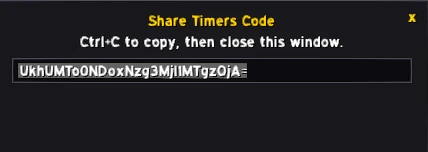
Request Sync asks other connected players for the timers they know. It has a three-minute cooldown, shown next to the button, so the channel is never flooded. If you would rather not rely on the channel, Share Timers creates a compact code containing your current timers that you can paste into Discord, a whisper or a second account, and Import Timers merges such a code into your own data using the same freshness rules as a normal sync, so an older code can never overwrite newer information.
Sounds you can choose
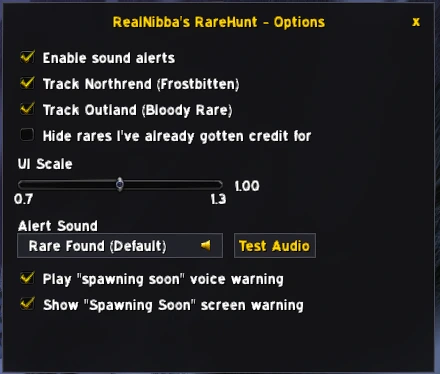
Alerts for incoming spot reports use a sound you pick in the options. The list includes RareHunt's own sounds and, through LibSharedMedia, any sounds provided by other addons such as ElvUI, and a Test Audio button lets you check the volume before you need it.
The rules screen and the unlock step
Because all users share one channel, how you use the addon affects everyone. The first time you start it, RareHunt shows a short set of rules and asks a question to make sure they were read: never type in the shared channel yourself, respect the built-in cooldowns, do not spam the sync button, and do not hand the channel name to people who have not read the rules. You get five attempts. A wrong answer counts against you, and on the fifth the addon disables itself on that character for good, so read the screen properly.
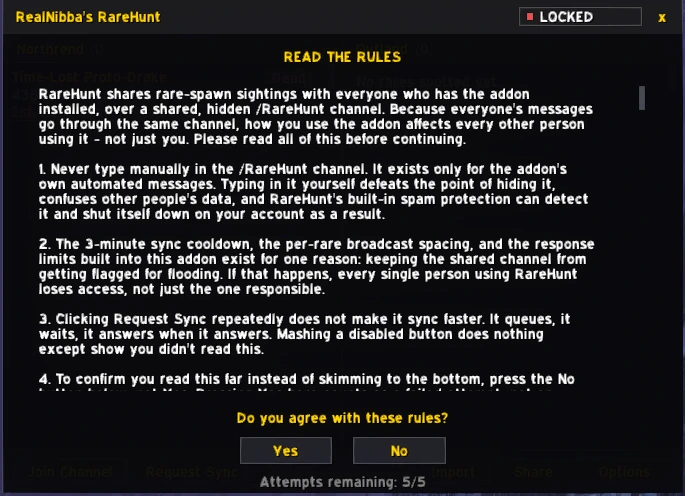
The addon also stays locked until you are actively tracking Frostbitten or Bloody Rare. Two buttons add the achievements to your Objectives Tracker for you, and once one of them is tracked the window unlocks. This keeps the addon focused on the two achievements it was made for.
Installing RareHunt
- DownloadGet rarehunt.zip from the button on this page. It contains a single folder,
RareHunt. - ExtractWith the game closed, extract that folder into the
Interface\AddOnsfolder of your 3.3.5a client. - Log inTick RareHunt in the AddOns list (and "Load out of date AddOns" if needed), enter the game, and type
/rh. Read the rules screen, then track one of the two achievements and click Join Channel.
Join Channel connects you to the public /RareHunt channel. It is safe to click once and it will not reconnect if you are already in, but clicking it repeatedly shows a one-time warning, and repeating it after that disables the addon on your whole account.
Commands and options
| Command | What it does |
|---|---|
/rh | Open or close the tracker window (also /rarehunt). |
/rh sync | Request timers from other players. Limited to once every three minutes, and only usable in Northrend or Outland. |
/rh config | Open or close the options window. |
- Enable sound alerts plays your chosen sound when another player reports a rare.
- Track Northrend and Track Outland switch each zone group on or off. Switching one off hides its whole column.
- Hide completed rares hides rares you already have credit for.
- Spawn warning sound and Spawn warning text control the voice line and the banner at three and one minutes.
- UI Scale resizes the tracker window.
Tips and troubleshooting
- The window says it is locked. Track Frostbitten or Bloody Rare with the buttons on the lock screen, or in your Objectives Tracker.
- No timers show up. Check Channel Status. If it does not say Connected, press Join Channel once. If you are connected and still see nothing, nobody has reported a sighting recently, so use Request Sync a few minutes later.
- A required update message appears. The addon can ask for a newer version to keep everyone compatible. Download the current zip from this page, replace the folder and restart the game.
- Never type in the channel yourself. It exists for the addon's automated messages, and manual typing can make the built-in protection shut the addon down on your account.
RareHunt FAQ
QDoes RareHunt work if I play alone?
Yes for your own sightings, but the estimates for everyone else's rares depend on other players running the addon and reporting. With few users online you may see fewer timers.
QWhich achievements does it cover?
Frostbitten, which needs 23 Northrend rare creatures, and Bloody Rare, which needs 20 Outland rare creatures.
QWhy does it ask me to read rules?
All users share one hidden channel, and misuse by one person can get the channel flagged for everyone, so the addon checks that you understand the few rules that keep it safe.
QCan I share timers without the channel?
Yes. Share Timers makes a code you can paste anywhere, and Import Timers merges a code into your data using the same freshness rules as a normal sync.
QDoes it change any game files?
No. It is a normal addon in the AddOns folder. It keeps its settings in RareHuntDB and RareHuntSettings, which the game stores in your WTF folder.
Get RareHunt
rarehunt.zip · 568 KB · version 1.0 · free
Contains RareHunt. Extract into your Interface\AddOns folder as described in the install section, then reload the game.
The rest of the lineup
See all five addons. Running more than one? The addon suite setup guide covers the folder layout and the two shared dependencies.