H/A Bis TrackerHerald & Argent gear tracker
Track your Herald of the Titans and Argent Defender BiS gear in game, see it on a 3D preview of your own character, and never miss a roll on a piece you need.
The Herald of the Titans and Argent Defender achievements cap your average item level, so every slot matters and a wrong piece can cost you the run. This addon keeps the plan in front of you: which item goes where, which ones you already own, which ones still have to drop, and a loud alert the second one is up for roll.
- Version
- 1.0
- Game
- WotLK 3.3.5a (Interface 30300)
- Folder
- RNBiSTracker
- Opens with
- /bis or /rnbis
- Extras
- Optional Endgame Data Pack
- Cost
- Free
- Download
- 969 KB zip
What the H/A Bis Tracker does
The H/A Bis Tracker is a gear checklist that lives inside the game. You pick the scenario you are working on (Herald of the Titans or Argent Defender), your spec, and the build variant you follow, and the addon lays out the target item for every equipment slot. It reads your bags, your bank and your equipped gear, marks what you already have, and shows what is still missing and where it comes from.
The item lists are the same verified data as the Herald of the Titans and Argent Defender BiS pages on this site, so the window in game and the list you read in your browser never disagree. If you would rather look things up before you log in, those pages have every item, gem and enchant written out for each spec.
It is built for people who are actively gearing: raiders who want to see at a glance what a boss can still give them, and players who roll on loot in a group and do not want to keep alt-tabbing to a spreadsheet to check whether a drop is worth a Need.
How it works, feature by feature
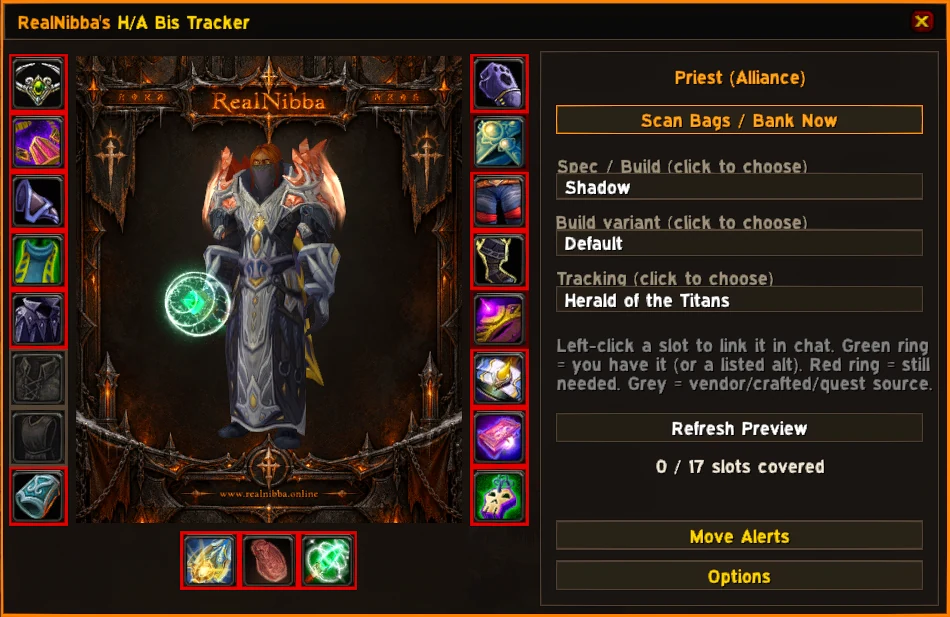
A character preview that is already dressed
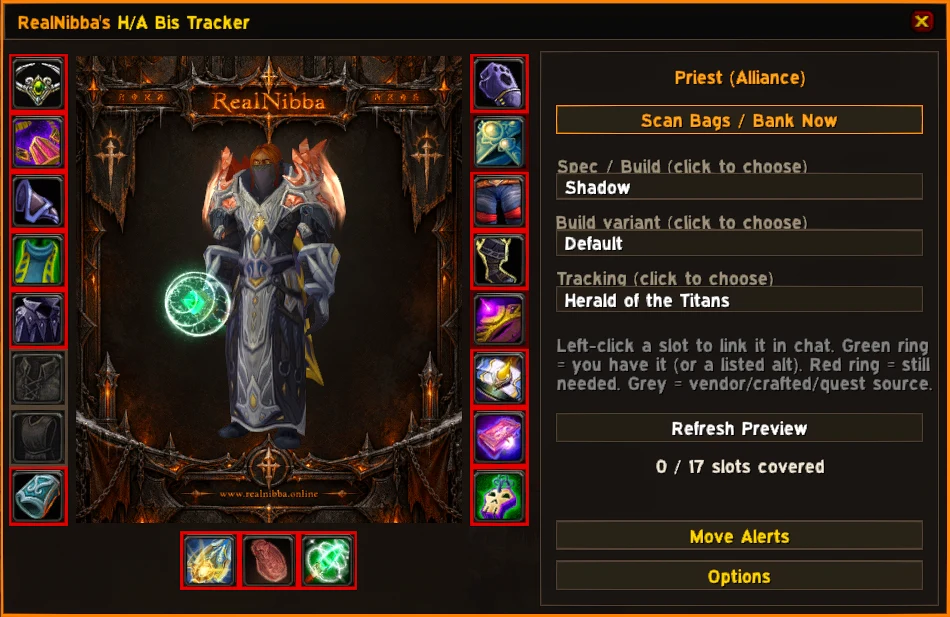
Open the window and your own character model is standing there wearing the target gear for your build. There is no generate button and no setup step, and it works even when you own none of the items yet, because the point is to show what you are aiming for. Drag with the mouse to turn the model and look at any piece from the side or the back. The two columns of slots around the model copy the layout of the real character panel, and the weapon row folds Ranged and Relic into a single slot, since they share one inventory slot in this expansion.
Rings that tell you what to do next
Every slot has a coloured ring. Green means you have the item, or a listed alternative for that slot. Red means you still need it and it is a real boss drop, so it is worth farming. Grey means you still need it but it is bought, crafted or a quest reward, so it is shown for information and never raises a drop alert. Whether you own something is decided by a real scan of your bags, bank and equipped slots, not by chat messages, which means nobody can mark an item as owned just by linking it.
Roll and drop alerts
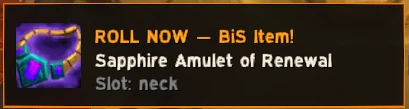
This is the part the addon was built around. When a Need or Greed window opens in Group Loot and the item is on your list, an alert pops up at once. Master Loot raids are covered too: any raid warning that contains a real link to a tracked item raises the same alert, whichever addon or person posted it. The alert pulses and plays a sound until you dismiss it or its timer ends, and you can drag it to any spot on the screen and lock it there. A quieter notice appears from loot chat whenever a tracked item drops for anyone in the raid.
Tooltips that answer the question for you
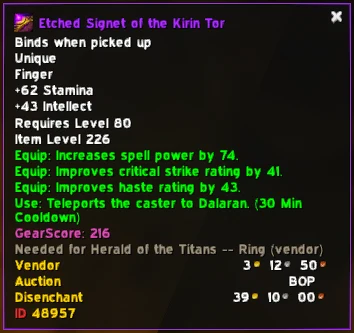
You do not have to open the window to know whether an item matters. Hover any item, or click its chat link, in your bags, at a vendor, in a trade window or in loot, and a line is added to the tooltip: a green line when you already have it for your scenario, a red one such as "Needed for Herald of the Titans" with the slot and where it comes from when you do not.
The shirt and tabard warning
Both achievements are decided by an average item level, and a shirt or tabard counts towards that average like any other equipped piece. The tracker keeps those two slots empty, the way the character panel does, and hovering either one shows a plain DO NOT EQUIP warning so you do not wreck an attempt with a cosmetic.
Installing the tracker
- DownloadGet bistracker.zip from the button on this page. It contains one folder,
RNBiSTracker. - ExtractClose the game, then extract the folder into the
Interface\AddOnsfolder of your 3.3.5a client. It should sit next to your other addons, not inside another folder. - EnableOn the character-select screen open AddOns, make sure it is ticked, and tick "Load out of date AddOns" if your client asks for it. Log in and type
/bis.
The zip is small because the addon carries its own item data and sounds and needs no other addon. If you later want endgame gear tracking as well, the separate Endgame Data Pack goes into the same AddOns folder and is picked up automatically after a /reload.
Setting it up the first time
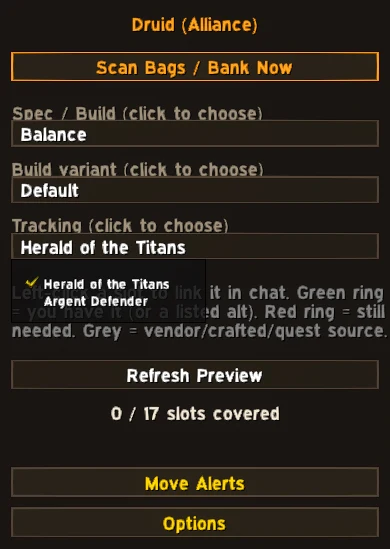
Open the settings with /bis config. Under Tracking choose the scenario to view, then your spec or build, then the build variant if your spec has more than one. The scenario setting only changes what the window and the preview show. Alerts watch every installed scenario at the same time, so a drop that matters for Argent Defender still alerts you while you are looking at Herald.
Under Alerts you decide whether to be warned when an item is up for roll and whether to see a notice when one drops, pick the roll sound and test it, set how long each popup stays (drop notices 3 to 20 seconds, roll alerts 10 to 60 seconds), and move the popup with Move Alerts. Have / Need Scanning has a Scan Now button and a switch that lets a listed alternative item count as owned.
Commands and settings
| Command | What it does |
|---|---|
/bis | Open or close the tracker window (also /rnbis). |
/bis scan | Force a full re-scan of bags, bank and equipped gear. |
/bis config | Open the settings: scenario, spec, alerts, sound, scale. |
/bis movealerts | Show the draggable placeholder to reposition the alert popups. |
The Window / alert scale slider resizes the tracker and every alert popup together, so they stay in proportion. The minimap button can be hidden if you prefer slash commands. The bank can only be read while the bank window is open, which is a client limit rather than a bug, so the addon keeps the last bank contents it saw until you open the bank again.
The Endgame Data Pack
The base tracker knows two scenarios, both deliberately capped below current raid gear. The Endgame Data Pack is a separate download that adds a third scenario, Endgame BiS, for full Icecrown Citadel, Ulduar and Trial of the Grand Crusader gearing: 10 classes, 33 specs and 52 build profiles, built from 1,053 items. It also adds an orange ring, which means you own a listed alternative rather than the exact first pick for that slot. Install it by dropping the RNBiSTracker_Enhanced folder next to RNBiSTracker. Remove the folder and the tracker quietly goes back to two scenarios.
Tips and troubleshooting
- The preview looks bare. Check that the right scenario, spec and variant are selected. The preview dresses whatever build is chosen, owned or not.
- An item shows as missing after you looted it. Press
/bis scan. Bags are scanned automatically, but a bank item only counts after the bank window has been opened once. - No alert appeared. Grey items never alert, and the alert options must be switched on under Alerts. Use Test Sound to check the audio, and Move Alerts to make sure the popup is not off screen.
- Two rings claim the same item. In the Endgame scenario one physical copy of an item is only counted for one slot, so a second ring will show as still needed until you own another.
H/A Bis Tracker FAQ
QDoes the H/A Bis Tracker work on Retail or Classic Era?
No. It is written for the WotLK 3.3.5a client (Interface 30300) and will not load anywhere else.
QDo I need another addon for it to work?
No. The tracker carries its own data, sounds and libraries. The Endgame Data Pack is optional and separate.
QDoes it work with Master Loot and with Group Loot?
Yes. Group Loot uses the native Need and Greed popup, and Master Loot raids are detected from raid warnings that contain a link to a tracked item.
QWhy is my bank not counted?
The game only lets an addon read the bank while the bank window is open. Open it once and the addon remembers the contents until the next visit.
QCan I track Herald and Argent at the same time?
The window shows one scenario at a time so a slot never has two answers, but alerts watch all installed scenarios together.
Get H/A Bis Tracker
bistracker.zip · 969 KB · version 1.0 · free
Contains RNBiSTracker. Extract into your Interface\AddOns folder as described in the install section, then reload the game.
The rest of the lineup
See all five addons. Running more than one? The addon suite setup guide covers the folder layout and the two shared dependencies.